

The car tracker annual check process is a formal audit of your device, subscription, and installation certificate. Insurers use it at renewal to confirm cover and any premium discount. The single most time-sensitive action: locate your installation certificate, confirm your monitoring subscription is active, and verify your device carries Thatcham-approved status if your policy requires it.
Three things to check today:
- Subscription status — log into your tracker app or portal and confirm the monitoring account is active and billing is current.
- Installation certificate — find the document showing the accredited fitter’s details, installer stamp, and device serial number.
- Thatcham-approved category — check whether your policy wording names a specific category (S5, S7, or S5 Plus) and confirm your device matches it.
If all three are in order, you are well placed for renewal. If any one is missing or expired, act before your renewal date.
Table of Contents
- What does an insurer’s annual tracker check actually inspect?
- How to prepare and pass your tracker annual check
- What is the right maintenance rhythm for your tracker?
- Common reasons tracker checks fail and what to do about each
- If your tracker fails the check: next steps and realistic timelines
- Why Thatcham approval matters and what documents to show your insurer
- Key takeaways
- Why a pre-renewal audit is worth doing every year
- Thatcham Trackers: compliant devices and renewal support
- Useful sources and further reading
What does an insurer’s annual tracker check actually inspect?
Insurers do not simply accept that a tracker is fitted. They verify a specific set of evidence points, and a gap in any one of them can cost you the premium discount or, in some cases, the cover itself.

| Inspection item | What the insurer looks for | Why it matters |
|---|---|---|
| Device model and serial | Matches the certificate and policy wording | Confirms the correct, listed device is fitted |
| Installation certificate | Accredited fitter details, date of fit, installer stamp | Uncertified fitting can void tracker benefit |
| Active subscription | Billing receipt or app account showing live monitoring | Lapsed monitoring removes theft-response cover |
| GPS/GSM connectivity | Recent location pings and signal history | Confirms the device is functioning in the field |
| Tamper and power-disconnect logs | Any alerts indicating defeat attempts | Flags deliberate isolation of the device |
| Immobiliser or driver tag status | Proof tags or immobilisation options are present | Required where policy specifies S5 or S5 Plus |
| Insurer acceptance of device category | Policy wording names S5, S7, or equivalent | Thatcham certification does not automatically guarantee insurer recognition |
Insurers commonly require both a Thatcham-certified device and an accredited installer’s certificate before accepting tracker benefits. The certificate is not a formality.
Pro Tip: Screenshot your tracker app’s subscription status page and save it as a PDF. Date the file. Insurers accept this as proof of active monitoring at renewal.
How to prepare and pass your tracker annual check
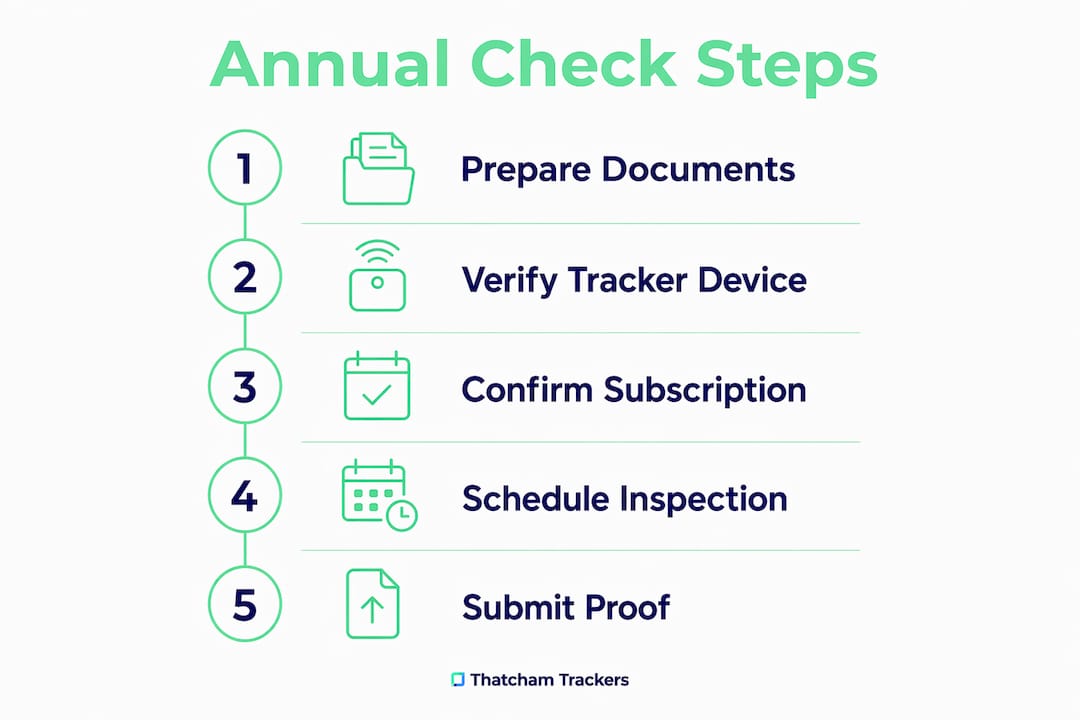
Follow these steps in the days before your renewal date. Each one addresses a specific evidence point insurers check.
-
Gather your documents. Collect the original installation certificate (installer stamp, fitter’s name and contact, date of fit), the device serial number, and any subscription receipts. If your policy names a Thatcham category, print or save the relevant product listing page showing that category.
-
Run live checks on the app. Open your tracker’s mobile app or web portal. Confirm the device has logged recent location pings. Check that driver tags are recognised (where fitted) and that movement alerts are active. Export or screenshot the last 30 days of activity as a PDF.
-
Verify subscription and billing. Download a payment receipt or account statement from the tracker portal covering the full policy period. A gap in billing, even a short one, is a common reason insurers query tracker benefits.
-
Confirm monitoring centre details. Check that the monitoring centre’s contact details on your account match those on your certificate. Outdated contacts are a straightforward fix but easy to overlook. Understanding the role of the monitoring centre in theft response is useful background here.
-
Send a brief email to your insurer or broker. Attach the installation certificate, subscription receipt, and app screenshots. A sample subject line: “Tracker compliance evidence for renewal — [your policy number].” Keep the email short: state the device model, Thatcham category, serial number, and confirm the subscription is active.
Pro Tip: If you bought your car second-hand, the tracker hardware may be fitted but the subscription inactive. Used vehicles often retain hardware without a live monitoring contract — contact the original provider to reactivate or transfer the account before renewal.
What is the right maintenance rhythm for your tracker?
A tracker is not a fit-and-forget device. Industry best practice recommends three tiers of checks: monthly, quarterly, and annual.
| Check | Frequency | Time needed | Who does it |
|---|---|---|---|
| App status and subscription | Monthly | 5 minutes | Owner |
| Alert log export and tamper review | Quarterly | 15 minutes | Owner |
| Full pre-renewal audit | Annually | 30 minutes | Owner, with installer if needed |
The monthly check is simply opening the app: confirm the subscription is active, tags are recognised, and there are no unread alerts. The quarterly review goes further. Export recent alert logs, check for any tamper or power-disconnect events, and confirm your monitoring centre contact details are still current. The annual car tracker review is the full audit: compile all certificates, verify the serial number against your certificate, and confirm insurer acceptance of your device category.
Pro Tip: Create a single folder (cloud or physical) labelled “Tracker Documents.” Store the installation certificate, subscription receipts, and quarterly log exports there. At renewal, everything is in one place.
Common reasons tracker checks fail and what to do about each
Most failed checks come down to the same handful of issues. Recognising them early means a straightforward fix rather than a last-minute scramble.
- Subscription lapse. An expired monitoring contract is the most frequent failure point. Insurers treat a lapsed subscription as equivalent to no tracker. Contact your provider immediately to reactivate, and obtain a backdated receipt if possible.
- Missing or invalid installation certificate. A device fitted by an uncertified installer, or one where the certificate has been lost, will not satisfy most insurers. Contact the original fitter for a copy, or arrange a re-fit with an accredited installer.
- Tamper or power-disconnect events. Logs showing the device was disconnected or tampered with raise insurer concerns about defeat attempts. Obtain a written explanation from your installer and, if the device was genuinely disturbed, have it inspected and re-certified.
- Device category mismatch. If your policy specifies Thatcham Approved S5 but the fitted device is S7, the insurer may decline the benefit. Confirm the category on your certificate against your policy wording and upgrade if necessary.
- Outdated monitoring centre or theft response contacts. A mismatch between the contacts on file and those on the certificate is a straightforward fix: update your account details and request a confirmation email from the monitoring centre.
If your tracker fails the check: next steps and realistic timelines
A failed check is not the end of the process. Most issues are resolvable within the insurer’s remedial window.
- Contact your tracker provider the same day. Request written confirmation of your account status, subscription history, and device serial. This is the starting point for any remediation.
- Notify your insurer or broker immediately. Ask for the remedial instructions in writing and confirm how long you have to resolve the issue before the benefit is withdrawn.
- Reactivate or transfer the subscription. Account reactivation typically takes 3–7 days. Request a receipt covering the full policy period.
- Book a technician visit if hardware is involved. A re-fit or inspection appointment can take 1–4 weeks depending on installer availability and device complexity. Trackers that include immobilisation or additional hardware generally require longer installation times and professional fitting.
- Obtain a new or updated installation certificate. Once the re-fit is complete, the accredited installer should issue a fresh certificate. Send this to your insurer with a covering note.
Costs vary by device category and whether new hardware is required. Subscription reactivation is typically the lowest-cost fix. A full re-fit with a higher-specification device, such as an S5 Plus with immobilisation, will cost more. Always obtain a written quote from your installer before committing.
Why Thatcham approval matters and what documents to show your insurer
Thatcham Research independently tests and lists vehicle security systems against the British Insurance Industry’s criteria. The categories most relevant to car owners are S5 (Vehicle Tracking Systems) and S7 (Asset Location Systems). Thatcham’s listing process includes production audits and ongoing performance monitoring, and listed systems are subject to review after twelve calendar months.
Thatcham certification evaluates functionality, design, and performance — but insurer acceptance remains a separate matter. A device can be Thatcham-listed and still require explicit confirmation from your insurer that it satisfies your specific policy wording. Always check both.
The documents insurers commonly request at renewal:
- Certificate of conformity or Thatcham listing confirmation for the device model
- Installation certificate showing the accredited fitter’s details, date of fit, and installer stamp
- Device serial number matching the certificate
- Monitoring contract or subscription receipt showing continuous cover
- Immobiliser or driver tag evidence where the policy requires it
The Thatcham-approved categories you may see on certificates include: Thatcham Approved S7, Thatcham Approved S5, Thatcham Approved S5 Plus, Ghost immobilisation, and the VanGuard Series. Show the certificate page or the product listing as proof of category. Understanding why insurance requires a Thatcham tracker helps clarify what your insurer is actually checking for.
Store scanned copies of all certificates. Export app logs quarterly and label files clearly (e.g. “TrackerSerial_InstallCert_2024.pdf”) so retrieval at renewal takes minutes, not hours.
Key takeaways
A compliant car tracker annual check requires active subscription proof, a valid installation certificate, and a device category that matches your policy wording.
| Point | Details |
|---|---|
| Subscription is the priority | A lapsed monitoring contract is the most common reason insurers withdraw tracker benefits. |
| Certificate is non-negotiable | An accredited installer’s certificate with stamp and serial is required by most insurers. |
| Category must match policy | Confirm your device category (S5, S7, S5 Plus) matches the exact wording in your policy. |
| Three-tier maintenance schedule | Monthly app check, quarterly log export, and a full annual audit before renewal. |
| Thatcham Trackers | Supplies Thatcham-approved S5, S7, and S5 Plus devices with accredited installation and renewal documentation support. |
Why a pre-renewal audit is worth doing every year
The case for a structured pre-renewal audit is straightforward. Insurers do not always prompt owners to provide tracker evidence — they may simply decline the discount if documentation is absent. A pre-renewal audit, done 4–6 weeks before the renewal date, gives enough time to resolve any subscription, certificate, or category issue without pressure.
Thatcham Research certification provides a credible, independently verified baseline. Paired with an accredited installer’s certificate and a live monitoring subscription, it gives insurers the evidence they need to apply the benefit. Thatcham Trackers works with installer networks that can supply re-fit certificates and subscription confirmation, and the support team can assist with documentation queries ahead of renewal.
Thatcham Trackers: compliant devices and renewal support
For owners who need a new compliant device or documentation support ahead of renewal, Thatcham Trackers supplies Thatcham-approved trackers across S5, S7, and S5 Plus categories, with professional installation included. Immobilisation options, including no-tag, no-start systems, are available for policies that require them.
If your tracker has failed a check or you need a fresh installation certificate, contact Thatcham Trackers with your device model, serial number, and insurer’s requirements. The team can advise on the right category, arrange accredited fitting, and supply the documentation your insurer needs. Browse the full range at thatchamtrackers.com or go directly to the Thatcham-approved collection to find a device that meets your policy requirements.
Useful sources and further reading
- Thatcham Research — Vehicle Security National Listing: the authoritative list of S5 and S7 approved systems referenced by UK insurers.
- Thatcham Security Certifications: explains the certification process and the distinction between listing and insurer acceptance.
- Insurance Approved Vehicle Trackers UK Guide: industry guidance on monthly, quarterly, and annual maintenance cadence.
- Thatcham Trackers — Insurance Approved Tracker Best Practices: practical guidance on maintaining compliance and preparing for renewal.
- How insurers verify tracker installation: step-by-step explanation of the insurer verification process and required documentation.
- Car tracker insurance requirement proof: UK guide: details on the specific documents insurers accept as compliance evidence.
Keep original installation certificates and subscription records in both physical and digital form. Insurers may request documents going back to the original fit date, particularly for high-value vehicles or disputed claims.