

Upgrading from an S7 to an S5 tracker is the process of replacing a Thatcham Category S7 GPS tracking device with a Category S5 system that adds Automatic Driver Recognition, stronger theft deterrence, and improved insurance compliance. The S5 category, certified by Thatcham Research, the UK’s central automotive risk intelligence organisation, represents a meaningful step up in protection. For owners of keyless entry vehicles, high-value cars, or any driver whose insurer now requires a higher-rated device, the transition from S7 to S5 is both practical and financially sound. This guide covers every stage of the upgrade, from understanding the technical differences to completing the installation correctly.
What are the main differences between s7 and s5 trackers?
The single most important distinction between S7 and S5 is Automatic Driver Recognition, known as ADR. ADR is exclusive to S5 trackers, using a fob or app to verify the authorised driver is present. If the vehicle moves without the ADR tag being detected, the monitoring centre receives an immediate alert. S7 trackers offer GPS tracking and 24/7 monitoring, but they cannot distinguish between an authorised driver and a thief.
Beyond ADR, S5 systems can include an optional immobilisation function, referred to as S5 Plus. This allows the monitoring centre or the owner to remotely prevent the engine from starting. S7 devices carry no equivalent capability. The practical result is that S5 trackers provide layered protection: location tracking, driver verification, and, where fitted, remote immobilisation.
Feature comparison: s7 vs s5
| Feature | S7 Tracker | S5 Tracker |
|---|---|---|
| GPS Tracking | Yes | Yes |
| 24/7 Monitoring | Yes | Yes |
| Automatic Driver Recognition | No | Yes |
| Remote Immobilisation | No | S5 Plus only |
| Key Cloning Protection | No | Yes |
| Typical Installation Time | 45–60 minutes | 1–2.5 hours |
| Device Cost | £189–£350 | £350–£600 |
| Monthly Subscription | £10–£18 | £14–£25 |
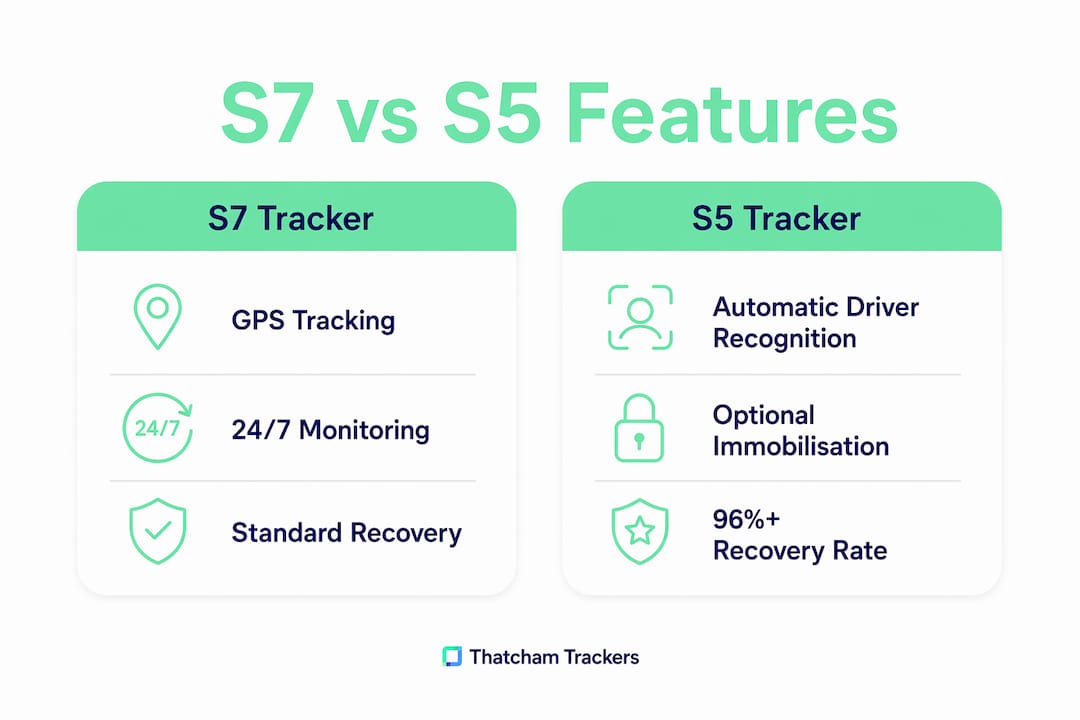
S5 trackers deliver over a 96% recovery rate for stolen vehicles. That figure reflects the combined effect of faster alert times and ADR-triggered monitoring responses. For owners of keyless entry vehicles, where relay attacks and key cloning are the primary theft methods, the S5 category is the appropriate standard.
Pro Tip: If your insurer has recently updated its requirements or your vehicle is valued above £30,000, check whether your current S7 device still satisfies your policy terms before your next renewal.
The cost difference between S7 and S5 is real: expect to pay £350–£600 for an S5 device versus £189–£350 for an S7. Monthly fees also rise from £10–£18 to £14–£25. That additional spend buys a materially different level of protection, not simply a badge upgrade.
What do you need before upgrading from s7 to s5?
Professional installation is not optional. Self-installation voids tracker approval and may invalidate your insurance policy entirely. Thatcham Research requires certified engineers to fit S5 devices to retain the category rating. Booking through a Thatcham-accredited installer is the only route that preserves both warranty and compliance.
Before your appointment, confirm the following:
- Vehicle compatibility: Not all S5 Plus immobilisation systems are compatible with every vehicle. Electric vehicle owners must verify S5 Plus compatibility before proceeding, as immobilisation hardware can conflict with EV electrical systems and void manufacturer warranties.
- ADR tag plan: You will receive one or more ADR fobs or app credentials. Decide in advance how many drivers need tags and where you will store them. Storing the tag on the same keyring as your car keys removes the security benefit entirely.
- Subscription commitment: S5 monitoring requires an active subscription. Confirm the monthly fee and contract length with your chosen provider before the installation date.
- Insurance notification: Inform your insurer of the planned upgrade. Some policies require written confirmation of the new device’s Thatcham category before coverage adjustments take effect.
Pro Tip: Request a written confirmation of Thatcham S5 certification from your installer on the day of fitting. Your insurer may ask for this document when you notify them of the upgrade.
You can compare approved S5 tracker options before your appointment to identify the right device for your vehicle type and budget.
Step-by-step: how to switch to s5 tracker from s7
The upgrade process follows a clear sequence. Deviating from it, particularly by attempting any stage without a certified engineer, risks both your insurance cover and the device’s Thatcham approval status.
-
Book a certified installer. Contact a Thatcham-accredited fitting centre. Confirm they are approved to install your chosen S5 device and that they will provide certification documentation on completion.
-
Arrange S7 removal. The existing S7 unit must be professionally removed. In most cases, the installer handles this as part of the upgrade appointment. Confirm whether removal is included in the quoted price or billed separately.
-
Confirm hardware selection. Decide between a standard S5 tracker and an S5 Plus with immobilisation before the appointment. If your vehicle is an EV or hybrid, provide the make, model, and year so the installer can verify compatibility in advance.
-
Attend the installation appointment. S5 installation takes 1–2.5 hours, longer than the 45–60 minutes typical for S7 fitting. The additional time reflects ADR wiring, immobilisation setup where applicable, and system testing. Plan accordingly and avoid booking the appointment immediately before a journey.
-
Set up ADR tags. The installer will pair your ADR fob or app credentials to the device. Test the tag before leaving the fitting centre. Confirm that removing the tag triggers an alert as expected.
-
Activate your monitoring subscription. Contact the monitoring provider to activate the S5 subscription. Do not leave the fitting centre without confirming the device is live and communicating with the monitoring centre.
-
Notify your insurer. Send written confirmation of the upgrade, including the Thatcham S5 certificate, to your insurer. Request written acknowledgement and ask whether your premium will be adjusted.
- If the device fails to communicate after activation, ask the installer to check the wiring and SIM card connection before you leave.
- If your insurer requires a specific S5 model or brand, confirm this before purchasing the device.
- Keep all installation paperwork, including the Thatcham certificate and subscription confirmation, in a secure location separate from your vehicle.
Pro Tip: Test the ADR alert function immediately after installation by walking away from the vehicle without the tag. A functioning S5 system should trigger a monitoring centre contact within minutes.
How to manage your s5 tracker for ongoing security

Correct ADR tag management is the most overlooked aspect of S5 ownership. Storing the ADR tag with car keys allows a thief who steals your keys to also carry the tag, bypassing the alert system entirely. Keep the tag on a separate keyring or in a location the driver accesses independently of the vehicle keys.
Subscription continuity matters as much as the hardware. A lapsed subscription disables monitoring, which means the 24/7 alert service stops functioning even though the device remains physically installed. Set a calendar reminder for your renewal date and confirm payment has processed each month.
For S5 Plus owners, the immobilisation feature requires periodic testing. Ask your monitoring provider how to verify the remote stop function is active. Some providers include a test protocol in their annual service check.
- Store ADR tags separately from vehicle keys at all times.
- Confirm your subscription is active after any change of payment method or bank details.
- Notify your monitoring provider if you change vehicles or sell the car, as the device and subscription are linked to the registered vehicle.
- Do not attempt to reposition or inspect the tracker unit yourself. Any physical interference with the device risks voiding the Thatcham approval.
- Review your insurer’s tracker requirements annually. Category standards and insurer policies both change, and your S5 device must remain compliant to maintain any premium benefit.
Pro Tip: If you have multiple authorised drivers, register an ADR tag for each one. A single shared tag creates a security gap whenever a second driver uses the vehicle without it.
For guidance on maintaining insurance compliance with your tracker, Thatcham Trackers publishes updated best practice guidance for 2026.
Key takeaways
Upgrading from an S7 to an S5 tracker delivers Automatic Driver Recognition, higher recovery rates, and stronger insurance compliance that an S7 device cannot provide.
| Point | Details |
|---|---|
| ADR is the core upgrade benefit | S5 trackers detect unauthorised movement without the ADR tag and alert monitoring immediately. |
| Professional installation is mandatory | Self-fitting voids Thatcham approval and may invalidate your insurance policy. |
| EV owners need compatibility checks | S5 Plus immobilisation can conflict with EV systems; confirm before booking installation. |
| ADR tag storage determines security | Keeping the tag separate from car keys is the single most important daily habit for S5 owners. |
| Cost increase reflects real protection | S5 devices cost £350–£600 with monthly fees of £14–£25, delivering a 96%+ vehicle recovery rate. |
The honest assessment of s7 to s5 upgrades
At Thatcham Trackers, the most consistent observation from customers who complete this upgrade is that they underestimated how much ADR changes the security picture. An S7 tracker tells you where your vehicle is after it has been stolen. An S5 tracker tells the monitoring centre the moment an unauthorised person moves it. That difference in response time is the difference between recovery and loss in many theft scenarios.
The mistake seen most often is treating the upgrade as a box-ticking exercise for insurance purposes. Owners fit the device, file the certificate, and then store the ADR tag on the same keyring as their car keys. The hardware is correct. The behaviour removes the benefit. ADR only works when the tag is genuinely separate from the vehicle.
The cost increase from S7 to S5 is real, and it is worth stating plainly. You will pay more for the device and more each month. For a standard vehicle in a low-risk area, an S7 may remain adequate. For a keyless entry vehicle, a high-value car, or any driver whose insurer now specifies S5, the upgrade is not a luxury. It is the appropriate level of protection for the risk profile of the vehicle.
First-time upgrade customers should use a Thatcham-approved tracker selector to confirm the right S5 model before booking installation. Choosing the wrong device for your vehicle type wastes time and money.
— Thatcham Trackers
Explore thatcham-approved s5 trackers for your vehicle
Thatcham Trackers stocks a full range of Thatcham-approved S5 devices, including S5 Plus models with remote immobilisation, suitable for standard vehicles, keyless entry cars, and commercial vans.
Every device in the range is independently certified by Thatcham Research and installed by accredited engineers. Monitoring plans are included with each purchase, and the team can advise on compatibility for electric and hybrid vehicles before you book. Browse the full S5 tracker range to compare specifications and pricing, or use the tracker selector tool to identify the right model for your vehicle and insurance requirements.
FAQ
What is the difference between s7 and s5 trackers?
S5 trackers include Automatic Driver Recognition, which alerts the monitoring centre if the vehicle moves without an authorised tag present. S7 trackers provide GPS tracking and monitoring but do not include ADR or immobilisation.
Does upgrading from s7 to s5 require professional installation?
Yes. Professional installation by a Thatcham-accredited engineer is mandatory for both S7 and S5 devices. Attempting self-installation voids the Thatcham approval and may invalidate your insurance policy.
How long does s5 tracker installation take?
S5 installation typically takes 1–2.5 hours, compared to 45–60 minutes for an S7. The additional time reflects ADR configuration and, where applicable, immobilisation wiring.
Can i fit an s5 plus tracker to an electric vehicle?
EV owners must verify S5 Plus immobilisation compatibility before installation, as the hardware can conflict with EV electrical systems and void the manufacturer’s warranty. Confirm with your installer before booking.
Will upgrading to s5 reduce my insurance premium?
Many insurers offer lower premiums for vehicles fitted with higher-rated Thatcham devices. Notify your insurer in writing after installation and provide the Thatcham S5 certificate to request a premium review.